Wednesday, September 16, 2015

Metropolis goes gritty

I have been taking photographs of water towers and back alleys in the city for years with the idea of eventually assembling them to create other images. Someone left a comment on a blog post a couple days ago about doing some water tower photos for the Metropolis series. This was enough to spur me into action. I had enough material to assemble not one, but two images for the series. The colorfulness of these two photos is caused by photographing some of the original scenes used for the composites at sunrise or sunset.

Metropolis - Alleys and rooftops a hidden city, NY, 2015


Metropolis - Drink up, NY, 2015

Tuesday, September 15, 2015

Things I like about the Fuji X100T - Part II

A few days ago I did a blog post on how I like the Fuji X100T for close-up photography. Since acquiring my X100T, I have integrated it into my work flow in many other ways, finding it adds a special, contemporary feel to lifestyle photography. The distinctive look of cell phone photography, particularly on Instagram, has come to dominate our modern visual vocabulary with its in-your-face closeness, its extreme depth of field caused by the short lenses due to minuscule sensor sizes, and its ability to be placed almost anywhere.  Commercial lifestyle photography usually mimics current visual trends, and the casual vernacular look of this trend is no exception.  The wide angle, close focusing lens of the X100T is perfect for re-creating this candid look. The idea is not to create an overly worked composition, rather something candid and casual, like the snapshot from a cell phone, yet with a higher-end, professional camera so the image is suitable for commercial use.

Placing the X100T right off the surface of a nearby desk accomplishes a look similar to picking up a cell phone for a causal snap shot of a co-worker in the office. The camera is small and light and can fit almost anywhere. 


The short focal length coupled with its ability to focus very close allows the camera to move in tight on people subjects. This delivers a "rouinding" effect that gives the shot a more casual, intimate look. Due to the proliferation of  digital cameras, the public has become very well aware of the look and feel of different lens effects, especially those of cell phone cameras. 


For this candid-looking shot I was able to place the small X100T on the dash board of the car and control it with the Fuji camera APP, which I find to be one of the best remote controls available for digital cameras. 


After covering a seen with my regular lifestyle lenses -- typically the 56mm, 35mm, and 90mm -- I then pickup the X100T and move in close to pick up some extra shots that have a different look due to the unique characteristics of the close focusing 23mm lens.

The two photos below illustrate the different look and feel of using the shorter 23mm lens on the X100T versus a more typical 90mm lens on an X-T1. The difference in the perspective is obvious, as is the treatment of the background in relation to the main subject. While the 90mm delivers a more polished, professional look, the 23mm has a candid look, more as if the mother feeding the child had picked up her cell phone and snapped the photo. Both images are "valid", but each has its own characteristics that address different uses of the image.

90mm lens Fuji X-T1

23mm lens Fuji X100T


Monday, September 14, 2015

Metropolis plus one

I was on a roll over the weekend and put together another image for my Metropolis portfolio. This one is a composite of five images, all bleeding through one another and tied together with a unifying structural grid. These images are quite large with a finished size of 40x40".

The title of this image, Metropolis - Higher and higher, reflects the constant upward movement of a city that never stops growing.

Metropolis - Higher and higher, NY, 2015

Sunday, September 13, 2015

My Metropolis portfolio gains an addition

Over the weekend I worked on a number of Photoshop images including this latest addition to my Metropolis portfolio. In this image I wanted to illustrate the sensual effect from the complex overlay of juxtaposing architectural styles found throughout the city.

Metropolis - Pre, post, now and then, New York, 2015


Friday, September 11, 2015

9/11

I began photographing the first World Trade Center on assignment when it was still under construction in the early 1970's. When the New World Trade Center began after 911, I photographed it from its beginnings to its completion. Below are a few photographs of the new building in homage to the day, 9/11.


Thursday, September 10, 2015

Shooting still life with my Fuji X100T

There were several reasons I decided to add the X100T to my Fuji camera pack. It's ability to focus so close with the 23mm lens was at the top of my list. Turns out I am using this camera much more than I had even anticipated. One of my primary applications is for still life photography. Getting in close with its 23mm (35mm equivalent) lens delivers a rounding effect to the subject, while the fast f/2 lens produces a pleasing selective focus with plenty of story-telling detail. This gives the images more of a casual, candid realism that sometimes mimics a cell-phone snapshot, or an old film camera.

Used wide open f/2 aperture, the images also have a soft glow about them that is very pleasing. Close the lens down for even one stop and the lens reverts to being sharp making it quite versatile. The Fuji style modes are another plus with this camera. I've come to really like Classic Camera with its muted colors and deep contrast. Although I always shoot in both RAW ans jpg at the same time, I can apply the camera style later in Adobe Camera Raw while using the jpg image as a reference for color and contrast. I usually go on to tweak the colors and contrast even further by adding a Vibrance adjustment layer in Photoshop to mute the colors even further. The photos below taken during a still life session in the studio using available window light were all done that way.

I almost never go anywhere without a camera. More and more, the camera around my neck is my Fuji X100T.


Monday, September 7, 2015

Composite imaging in Photoshop

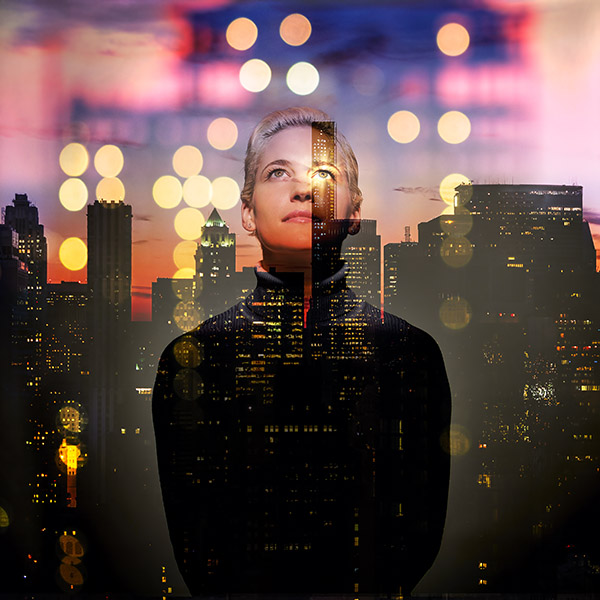
During a photo session this past week I took some time out to grab a number of photos of one of the models so I could use them in assembling composite images. Below are two variation of one of the first attempts. It is a triple exposure (quadruple in the image with the cloud), one of the model photographed in a dramatic light against a white background combined with two photos of the city, one in focus, and one out of focus. I added the star to the models eye to complete the image.

To blend the images I experiment with the various layer modes available in Photoshop, generally using Overlay, Hard or Soft Light, or Screen to merge the images. Sometimes the merger is as simple as turning down the opacity of the layer to allow the layers beneath to show through. To fine tune the blending I add a layer mask and paint areas in or out.

When working on these composite images I like to start with 16-bit RAW files converted to TIFs. This preserves the greatest color and detail and helps keep artifacting to a minimum as the image is manipulated.