 |
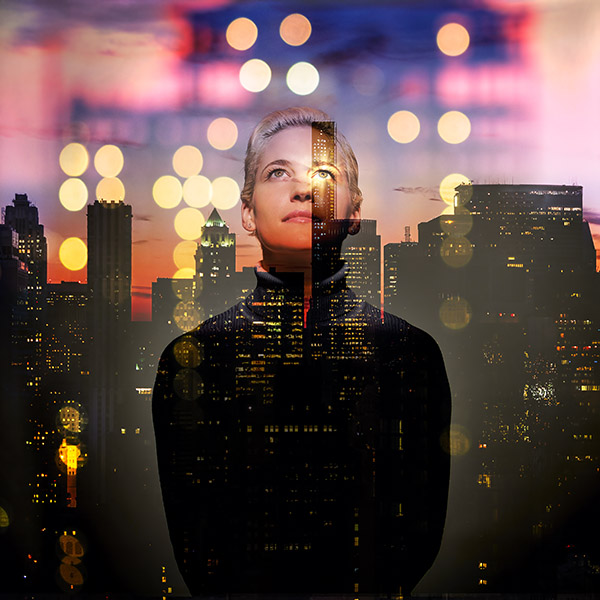
| Metropolis - Pre, post, now and then, New York, 2015 |

A photography blog covering: Digital, Film, Reviews, History, Cameras, Images, Technique, Stock Photography, and pretty much anything else photography related that comes to mind...with special coverage of Fujifilm X, Nikon, Sony, and Leica cameras.
Sunday, September 13, 2015
My Metropolis portfolio gains an addition
Over the weekend I worked on a number of Photoshop images including this latest addition to my Metropolis portfolio. In this image I wanted to illustrate the sensual effect from the complex overlay of juxtaposing architectural styles found throughout the city.

Friday, September 11, 2015
9/11
I began photographing the first World Trade Center on assignment when it was still under construction in the early 1970's. When the New World Trade Center began after 911, I photographed it from its beginnings to its completion. Below are a few photographs of the new building in homage to the day, 9/11.


Thursday, September 10, 2015
Shooting still life with my Fuji X100T
There were several reasons I decided to add the X100T to my Fuji camera pack. It's ability to focus so close with the 23mm lens was at the top of my list. Turns out I am using this camera much more than I had even anticipated. One of my primary applications is for still life photography. Getting in close with its 23mm (35mm equivalent) lens delivers a rounding effect to the subject, while the fast f/2 lens produces a pleasing selective focus with plenty of story-telling detail. This gives the images more of a casual, candid realism that sometimes mimics a cell-phone snapshot, or an old film camera.
Used wide open f/2 aperture, the images also have a soft glow about them that is very pleasing. Close the lens down for even one stop and the lens reverts to being sharp making it quite versatile. The Fuji style modes are another plus with this camera. I've come to really like Classic Camera with its muted colors and deep contrast. Although I always shoot in both RAW ans jpg at the same time, I can apply the camera style later in Adobe Camera Raw while using the jpg image as a reference for color and contrast. I usually go on to tweak the colors and contrast even further by adding a Vibrance adjustment layer in Photoshop to mute the colors even further. The photos below taken during a still life session in the studio using available window light were all done that way.
I almost never go anywhere without a camera. More and more, the camera around my neck is my Fuji X100T.


Used wide open f/2 aperture, the images also have a soft glow about them that is very pleasing. Close the lens down for even one stop and the lens reverts to being sharp making it quite versatile. The Fuji style modes are another plus with this camera. I've come to really like Classic Camera with its muted colors and deep contrast. Although I always shoot in both RAW ans jpg at the same time, I can apply the camera style later in Adobe Camera Raw while using the jpg image as a reference for color and contrast. I usually go on to tweak the colors and contrast even further by adding a Vibrance adjustment layer in Photoshop to mute the colors even further. The photos below taken during a still life session in the studio using available window light were all done that way.
I almost never go anywhere without a camera. More and more, the camera around my neck is my Fuji X100T.
Monday, September 7, 2015
Composite imaging in Photoshop
During a photo session this past week I took some time out to grab a number of photos of one of the models so I could use them in assembling composite images. Below are two variation of one of the first attempts. It is a triple exposure (quadruple in the image with the cloud), one of the model photographed in a dramatic light against a white background combined with two photos of the city, one in focus, and one out of focus. I added the star to the models eye to complete the image.
To blend the images I experiment with the various layer modes available in Photoshop, generally using Overlay, Hard or Soft Light, or Screen to merge the images. Sometimes the merger is as simple as turning down the opacity of the layer to allow the layers beneath to show through. To fine tune the blending I add a layer mask and paint areas in or out.
To blend the images I experiment with the various layer modes available in Photoshop, generally using Overlay, Hard or Soft Light, or Screen to merge the images. Sometimes the merger is as simple as turning down the opacity of the layer to allow the layers beneath to show through. To fine tune the blending I add a layer mask and paint areas in or out.
When working on these composite images I like to start with 16-bit RAW files converted to TIFs. This preserves the greatest color and detail and helps keep artifacting to a minimum as the image is manipulated.

Sunday, September 6, 2015
Metropolis
One more image for my Metropolis portfolio. The series keeps growing -- slowly. Most of these images take a long time to create. This one I call Metropolis - Just off the grid, 2015. It required less time because it is composed of only two super-imposed images, one of them including an abstracted distortion of a reflection of the Chrysler Building.

Friday, September 4, 2015
A trip to the market with a Sony A7RII and Leica M lenses
At the Union Square farmers market in New York it sometimes seems there are more cameras than produce with everyone snapping away at the colorful, locally-grown fruit, vegetables, and flowers fresh from the farm. I often use the market as a subject for testing new equipment. This time it was to try out my new Sony A7RII with a couple of Leica lenses. Leica M lenses have a drawback in that they do not focus very close. They are made this way to avoid the close-up parallax problem inherent with rangefinder cameras. Of course, when used today with a digital finders instead, the whole problem of parallax is avoided, but this does not change their ability to focus any closer. To get around this, I usually carry a couple of close-up filters with me -- not necessarily the best solution in that it adds an inferior optical solution that may deteriorate the superb Leica glass.
Voigtlander makes a VM-E Close Focus Adapter for the A7 series cameras that acts as a built-in extension tube, but I had some problems with this device when I tested it on a couple of other A7 bodies previously, so I stay away from it. If anyone else has tried this adapter successfully, please let me know.

One problem for me of shooting at the market is that it is getting to be boring as a subject-- same produce, same flowers, same vendor setups. It's difficult to do something original anymore. To change things up a bit, this time around I decided to concentrate on some of the grittier looking produce and post-process the images in a matching technique. With my Fuji X-T1 this would have been easier. Its Classic Chrome setting is a natural for this look. Deepen the shadows with a +1 or +2, mute the colors by dropping the color saturation a -1 and you have the perfect look right out of the camera. One thing the A7RII taught me on this trip is how much I miss the built-in conveniences of my Fuji X-T1.

The images here are samples of the results. Once I had the images in Photoshop, I muted down the colors using a Vibrance adjustment layer, and then placed a new layer of pure black color on top. I changed this layer to "Overlay", added a layer mask to it, and painted out the important central areas leaving a deep gritty vignette over the rest of the image.
These images were taken with a Summicron 50mm lens used wide open at f/1.4 and a +2 close-up filter. I particularly liked the bokeh effect this combo gave the images. One nice side benefit of using the Sony A7RII is that even with the image cropped to a square -- something I do a lot -- the 42mp sensor left me with a very large, 80mb photo.


Voigtlander makes a VM-E Close Focus Adapter for the A7 series cameras that acts as a built-in extension tube, but I had some problems with this device when I tested it on a couple of other A7 bodies previously, so I stay away from it. If anyone else has tried this adapter successfully, please let me know.
One problem for me of shooting at the market is that it is getting to be boring as a subject-- same produce, same flowers, same vendor setups. It's difficult to do something original anymore. To change things up a bit, this time around I decided to concentrate on some of the grittier looking produce and post-process the images in a matching technique. With my Fuji X-T1 this would have been easier. Its Classic Chrome setting is a natural for this look. Deepen the shadows with a +1 or +2, mute the colors by dropping the color saturation a -1 and you have the perfect look right out of the camera. One thing the A7RII taught me on this trip is how much I miss the built-in conveniences of my Fuji X-T1.
The images here are samples of the results. Once I had the images in Photoshop, I muted down the colors using a Vibrance adjustment layer, and then placed a new layer of pure black color on top. I changed this layer to "Overlay", added a layer mask to it, and painted out the important central areas leaving a deep gritty vignette over the rest of the image.
These images were taken with a Summicron 50mm lens used wide open at f/1.4 and a +2 close-up filter. I particularly liked the bokeh effect this combo gave the images. One nice side benefit of using the Sony A7RII is that even with the image cropped to a square -- something I do a lot -- the 42mp sensor left me with a very large, 80mb photo.
Wednesday, September 2, 2015
Shooting for the cloud
I've had so many companies try to sell me storage space in the cloud recently that I thought I'd turn the tables and create some images to sell them instead. So I put together the two images below in Photoshop this past week. When shooting with models I often pick up a few general images that can be used later to create various commercial concepts. I also collect images of clouds and miscellaneous scenics for the same purpose.


Subscribe to:
Posts
(
Atom
)